
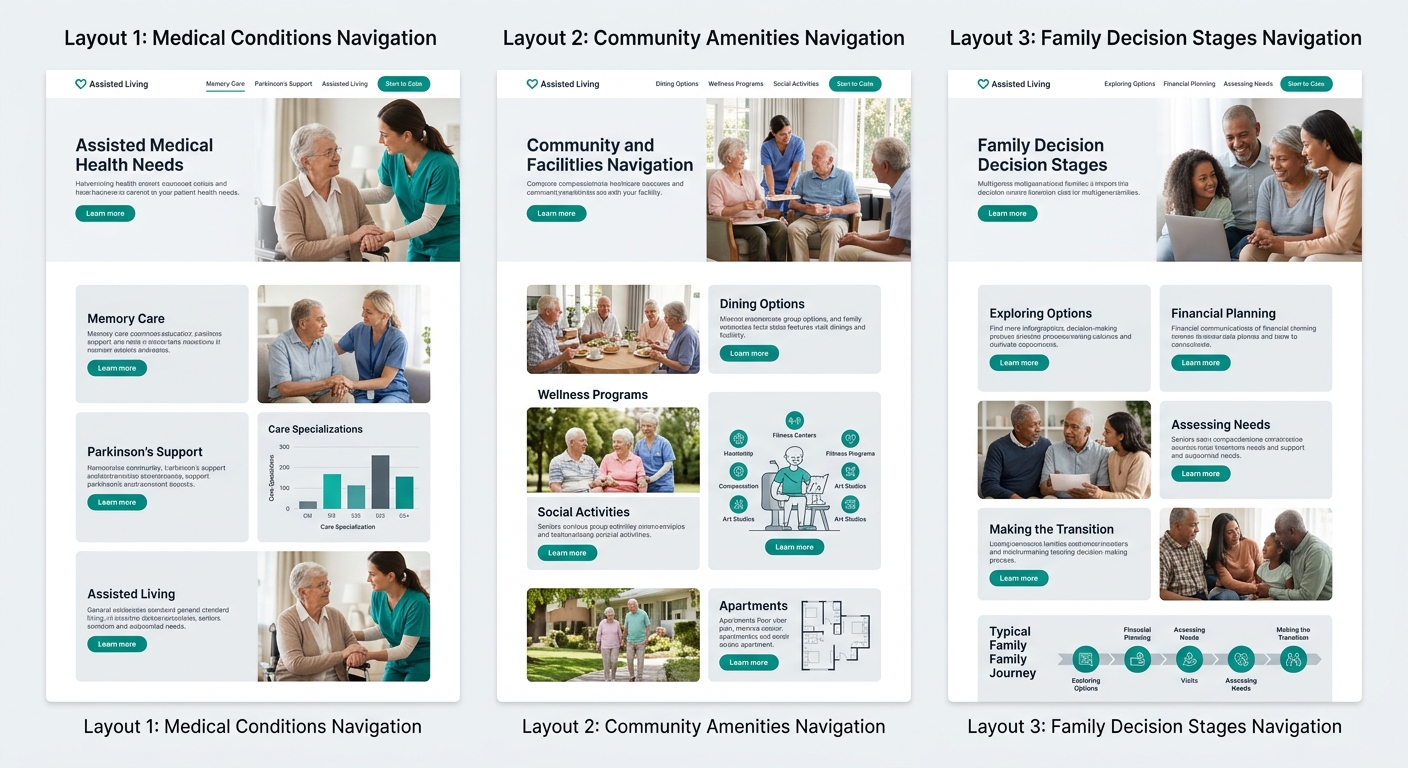
Assisted living operators typically build their content libraries around one of three architectures: medical conditions, community features, or the family’s decision timeline. Rebuilding around decision stages produces the highest organic inquiry rates because it mirrors the exact search sequence families follow, from first concern to signed move-in agreement.
TL;DR: Three content architectures compete for organic assisted living leads. Condition-focused content attracts clinical searches but stalls before conversion. Service-feature content converts tour-ready families but misses the 88% who need more guidance earlier. Decision-stage content captures families at every point in their timeline and produces the strongest organic inquiry growth because 39% of prospective residents find communities through organic search.
Families searching for senior living follow a predictable arc: recognition that care is needed, research into options, evaluation of specific communities, and a final decision that often takes several weeks. Your content architecture either maps to this arc or it doesn’t. The gap between mapping and not mapping shows up directly in your admissions inquiry volume.
Three approaches dominate. Each has real strengths, each carries tradeoffs that aren’t obvious until you’re 6 months into a content investment, and each produces a different type of organic traffic.
Condition-Focused Content Captures Clinical Searches but Creates Dead Ends
Condition-focused content organizes pages by diagnosis or care need: memory care for Alzheimer’s, assisted living after hip replacement, support for Parkinson’s disease, managing diabetes in a residential setting. The logic is straightforward. Families often start their search with a medical condition, so building content around diagnoses puts you in front of those searches.
The strength is real. These pages attract searchers with specific, urgent needs. A daughter searching “assisted living for mom with dementia” has already accepted that care is necessary. She’s past the denial stage. That’s high-intent traffic.
But the architecture has a structural problem: it creates content that educates without advancing the decision. A family reads your page about dementia care options, gains useful information, and then leaves. The page answered a medical question. It didn’t answer the decision question: “Is this the right community for my mother?”
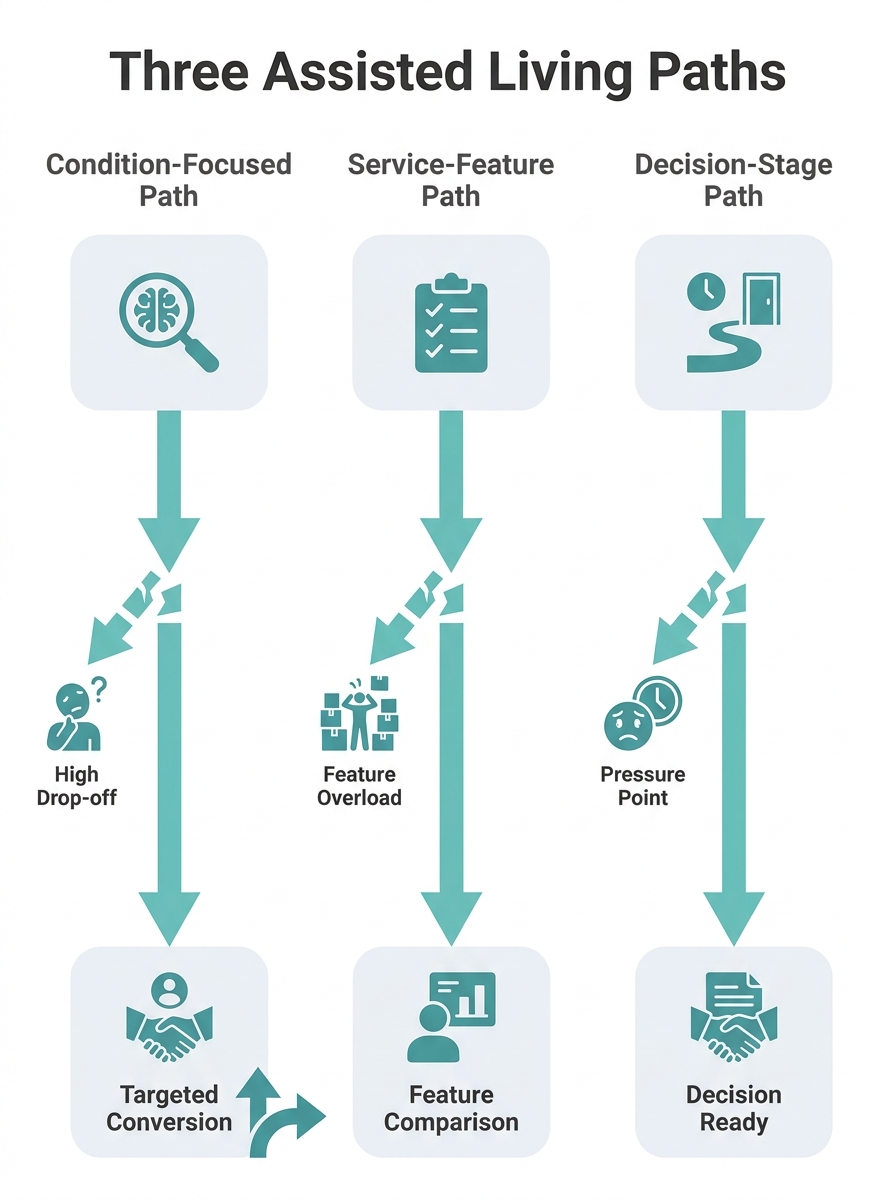
Condition-focused content also crowds into a narrow keyword band. Every assisted living community with a memory care wing publishes some version of “Understanding Alzheimer’s and Memory Care.” Competing against WebMD, Mayo Clinic, and the Alzheimer’s Association for clinical search terms is expensive and slow. With 63 million Americans serving as family caregivers and initiating these searches, the audience is enormous, but the organic competition for medical keywords dwarfs what most regional operators can sustain.
The conversion path from condition-focused content to admissions inquiry requires the visitor to navigate from an educational page to a community-specific page on their own. That handoff fails more often than it succeeds. Operators using this architecture consistently see high pageviews with low inquiry-to-visit ratios.
Service-Feature Content Converts Tour-Ready Families but Misses Everyone Else
Service-feature content organizes pages around what the community offers: dining programs, fitness amenities, staff-to-resident ratios, pet policies, transportation services, activity calendars. The logic is competitive differentiation. Families comparing two or three communities need feature-level detail to make a choice.
This architecture works well for one specific audience segment: families who’ve already decided on assisted living and are comparing specific communities. For this group, detailed feature pages are exactly what they need. A page explaining your dining program, your staffing credentials, or your therapy partnerships answers the comparison questions that drive final decisions. If you’ve ever wondered why generic messaging about “compassionate care” underperforms, service-feature content is the corrective. It replaces vague claims with concrete details.
The problem is timing. Service-feature content speaks to the last 10-15% of the decision timeline. According to research published by McKnight’s Senior Living on digital strategy optimization, 88% of families report needing more guidance when navigating senior care options. These families aren’t comparing dining programs yet. They’re trying to figure out whether assisted living is appropriate at all, how to talk to a parent about it, what it costs, and how to pay for it.
Warning: If your content library is 80% feature pages and 20% everything else, you’re invisible to families in the first three stages of the decision process. Those stages represent the majority of search volume.
Service-feature content also struggles with a keyword problem. Terms like “assisted living with physical therapy” or “pet-friendly senior living” carry lower search volume than decision-oriented queries like “how much does assisted living cost” or “when is it time for assisted living.” The organic traffic ceiling for a feature-only library is lower than operators expect.
The architecture is strong as a component. As a complete content strategy, it leaves 85% of the care decision timeline uncovered.
Decision-Stage Content Follows the Family’s Actual Search Behavior
Decision-stage content organizes pages around where the family is in the process, mapping content to the recognition, research, evaluation, and transition phases that define the family decision journey. Instead of asking “What do we offer?” or “What conditions do we treat?”, this architecture asks “What does this family need to know right now, at this point in their decision?”
The content map looks different from the other two approaches:
- Recognition stage: “Signs Your Parent May Need More Support Than You Can Provide,” “How to Talk to Your Family About Assisted Living”
- Research stage: “How Much Does Assisted Living Cost in [Region]?”, “Assisted Living vs. Home Care: A Cost and Care Comparison”
- Evaluation stage: “12 Questions to Ask During an Assisted Living Tour,” “How to Evaluate Staffing Levels at a Senior Living Community”
- Transition stage: “What to Expect During Your Parent’s First 30 Days,” “How to Help a Parent Adjust to Assisted Living”
This architecture captures organic traffic at every stage because it targets the actual queries families type. Heyflow’s research on senior living lead generation found that 39% of prospective residents find communities through organic search, making this the single largest discovery channel. Decision-stage content maximizes coverage across the full range of those searches instead of concentrating on one segment.
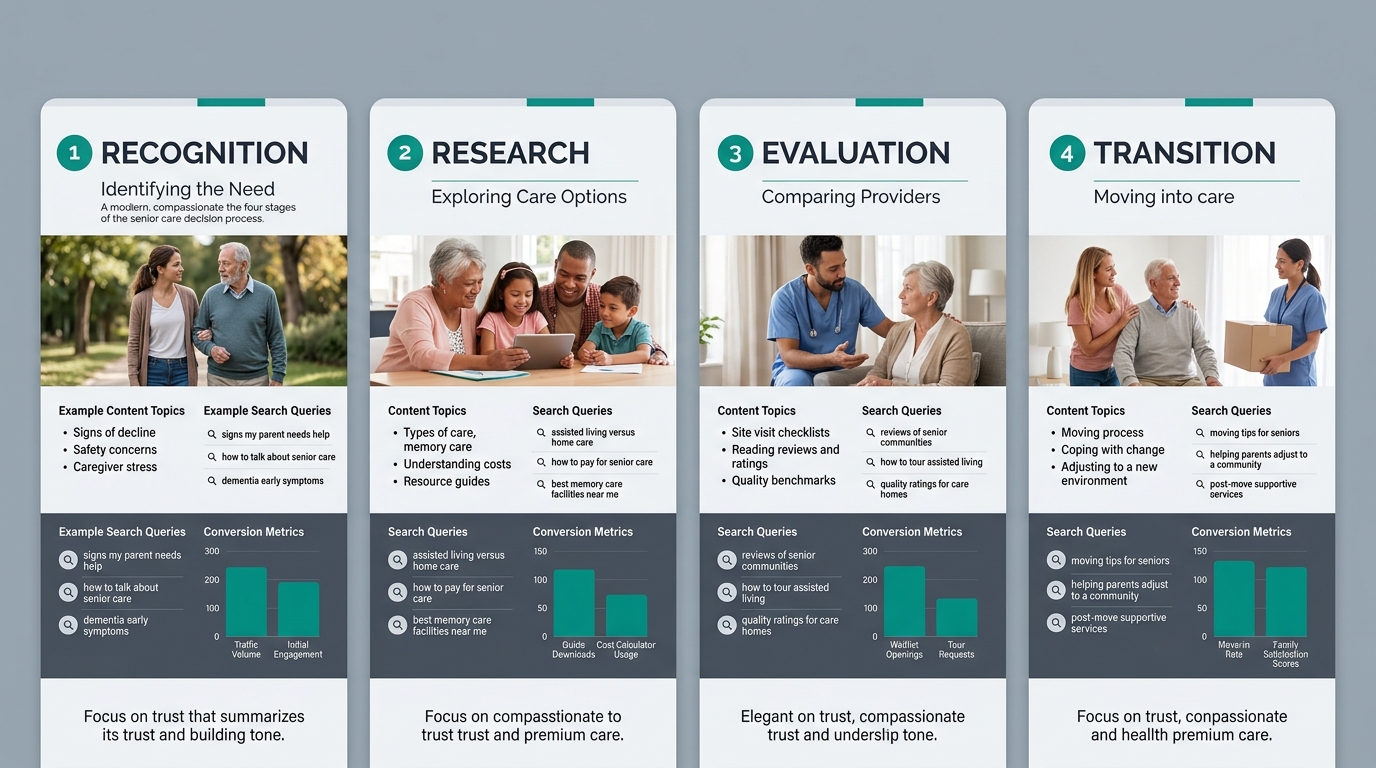
The conversion advantage is structural. Each page includes a stage-appropriate call to action. Recognition-stage content offers a downloadable guide or cost calculator. Research-stage content invites a consultation call. Evaluation-stage content promotes tour scheduling. Transition-stage content connects to the admissions coordinator. The call to action matches the family’s readiness, which eliminates the “tour now!” mismatch that kills conversion on early-stage pages.
Regional operators who’ve rebuilt their content around this framework report organic inquiry increases of 40-60% within 6-12 months, consistent with the SEO timeline that industry data confirms. Cardinal Digital Marketing documented a 225% total conversion increase for a senior care group that restructured its digital presence to align with family search behavior, though that result included paid channels alongside organic.
The national median assisted living cost sits at $5,419 per month in 2026. At that price point, every organic inquiry that bypasses a referral platform like A Place for Mom saves the operator a substantial percentage of first-month rent. An assisted living content strategy built around decision stages reduces dependence on paid referral sources by generating senior living organic leads directly.
Decision-stage content works because it answers the question the family is actually asking, at the moment they’re asking it, with a next step that matches their readiness.
The tradeoff is effort. Building and maintaining decision-stage content requires more planning than either condition-focused or feature-focused libraries. You need content at every stage, each piece needs a clear place in the progression, and the editorial approach to admissions content demands ongoing updates as costs, regulations, and family expectations shift. Operators who treat content as a one-time project rather than an ongoing program see the initial gains flatten after 12 months.
Side-by-Side Comparison
| Attribute | Condition-Focused | Service-Feature | Decision-Stage |
|---|---|---|---|
| Primary organization | By diagnosis or care level | By amenity or program | By family decision timeline |
| Strongest audience | Families with a known diagnosis | Families comparing 2-3 communities | Families at any point in the process |
| Keyword competition | Very high (competing with medical sites) | Moderate (niche feature terms) | Lower (intent-aligned long-tail) |
| Organic traffic ceiling | Low-medium | Medium | High |
| Conversion path clarity | Weak (educational dead ends) | Strong for late-stage only | Strong across all stages |
| Content maintenance burden | Moderate | Low | High |
| Typical time to measurable results | 6-12 months | 3-6 months | 6-12 months |
| Referral platform dependence reduction | Minimal | Moderate | Significant |
How to Choose Between These Three
The honest answer is that the best content funnel for assisted living combines elements of all three, but the decision-stage architecture should be the skeleton. Here’s why.
If your community serves a niche population (exclusively memory care, or exclusively post-acute rehabilitation), condition-focused content earns its place as a secondary layer. You’ll build 5-10 condition pages that support your specialty, but they feed into the decision-stage framework rather than standing alone.
If your community competes primarily on amenities or pricing, service-feature content belongs in the evaluation stage of the decision framework. Feature pages become the comparison tools families use after your recognition and research content has already brought them to the site. Our breakdown of how educational content targeting family decision-making pain points actually functions in practice shows this progression clearly.
If you’re a regional group with 3-15 communities, decision-stage content delivers the strongest ROI because it scales across locations. The recognition, research, and transition content works for all your communities. Evaluation-stage content gets localized per community. You build once at the framework level and customize at the location level.
Tip: Start by auditing your existing content against the four decision stages. Most operators discover that 70% or more of their library sits in the evaluation stage (feature pages and tour prompts), with almost nothing addressing recognition or research. Filling those two gaps typically produces the fastest organic traffic gains.
The 60% inquiry growth that regional operators report from this approach doesn’t come from any single page performing spectacularly. It comes from coverage. When your content library answers questions at every stage, you’re the resource families return to as they progress through their decision. You’ve built a relationship before the first phone call, and the inquiry that comes in is warmer, more informed, and further along than anything a referral platform delivers. That compound effect, across dozens of decision-stage pages working together over months, is what produces admissions content marketing results that a feature-only or condition-only library can’t match.