
A dedicated referral partner portal home care agencies use to track placements, a standard CRM for senior care referrals, and a hybrid that bolts portal features onto CRM workflows each promise faster network growth. The right pick depends on your agency’s size, referral volume, and how your discharge planner contacts prefer to communicate.
TL;DR: Dedicated portals give referral partners a branded login and self-service tracking, but adoption stalls when partners won’t use another system. Standard CRMs centralize contact data but lack referral-specific workflows. Hybrid setups that embed referral tracking inside an existing CRM grow networks fastest for most mid-size home care agencies.
Three Systems, Three Philosophies
Before comparing features, it helps to understand what each system assumes about your referral partners. A portal assumes partners will log in regularly. A CRM assumes your internal team will manage the relationship. A hybrid assumes both sides need visibility without extra logins. Those assumptions shape everything from adoption rates to how quickly a hospital discharge planner can send you a referral at 4:45 p.m. on a Friday.
The stakes are real. According to Activated Insights’ home care marketing research, agencies that track referral source performance see measurably stronger growth because they can identify which partnerships actually produce admissions. And 88% of businesses across industries now rank CRM integration as the most important feature in any referral management software, per industry benchmarking data. The tool you choose determines whether those relationships get tracked with precision or lost in a spreadsheet.
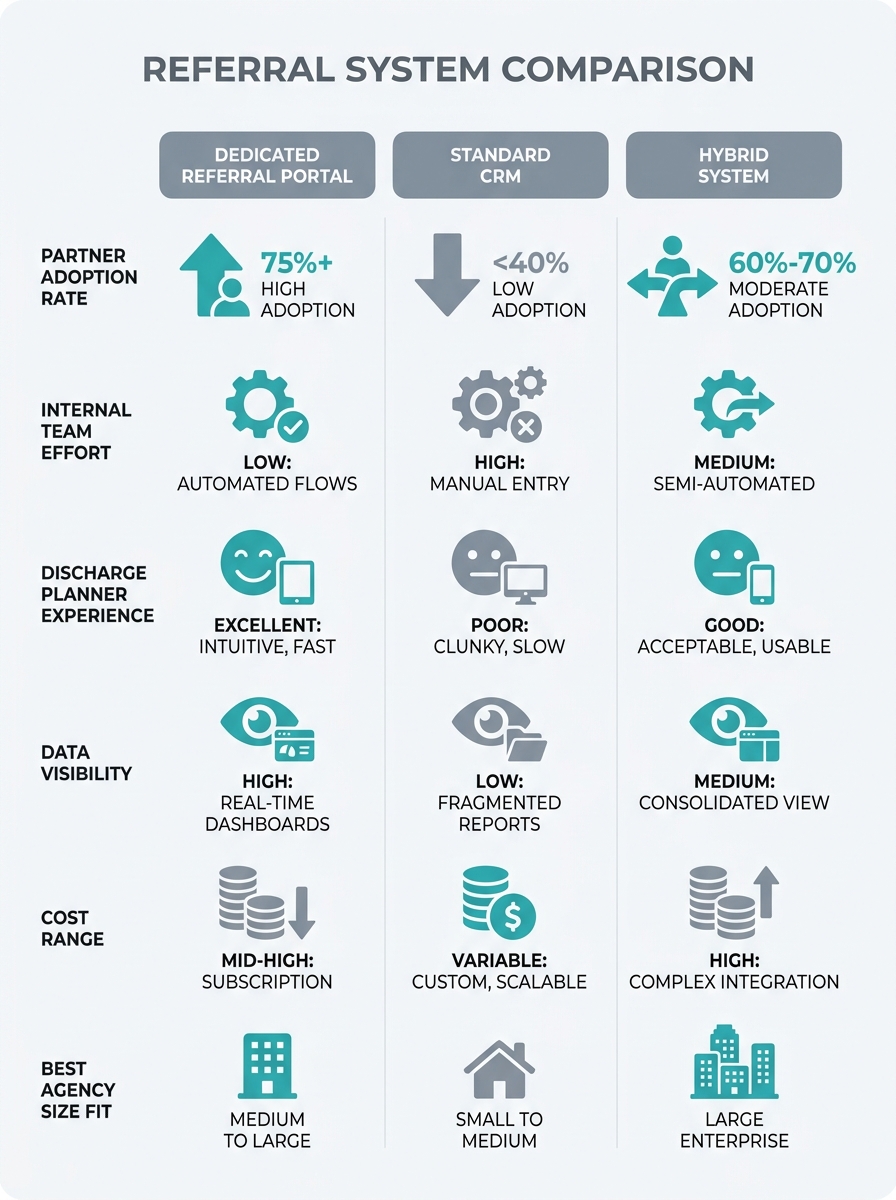
Here’s a side-by-side comparison of the three approaches across the metrics that matter most:
| Feature | Dedicated Portal | Standard CRM | Hybrid Setup |
|---|---|---|---|
| Partner self-service | Full (branded login) | None | Partial (email/link-based) |
| Internal team setup time | 40-80 hours | 10-20 hours | 20-40 hours |
| Discharge planner adoption | Low (15-25%) | N/A (internal only) | Moderate to high (50-70%) |
| Referral-to-admission tracking | Built-in | Requires custom fields | Plugin or integration |
| Cost range (annual) | $3,000-$15,000 | $600-$3,600 | $1,200-$6,000 |
| Best for | 100+ referral sources | Under 30 sources | 30-100 sources |
Option 1: The Dedicated Referral Partner Portal
Platforms like Senior Referral Management and SHP for Skilled Nursing offer purpose-built portals where referral partners log in, submit referrals, and track placement status. These systems were designed specifically for home care referral tracking and senior living placement agencies.
The appeal is obvious. Your hospital discharge planner relationships get a professional-looking interface. Partners can see where their referrals stand without calling your office. Capterra’s review of Senior Referral Management describes it as “an extraordinary breakthrough in managing your placement agency service,” highlighting the ability to “track your referrals, pending and open invoices, lists of current and past clients.” For agencies running 100+ active referral partnerships, that self-service layer saves dozens of phone calls per week.
But here’s the problem most vendors won’t mention: portal adoption among referral partners is consistently low. Discharge planners at busy hospitals already juggle 5-10 software systems daily. Asking them to create a login for your agency’s portal, remember the password, and check it regularly is a significant ask. Industry data suggests 65.7% of marketers cite data integration as their biggest challenge when managing multiple platforms. Your referral partners feel that same fatigue.
Haley Brown, Vice President of Clinical Services at Concierge Home Care, has emphasized the value of “real-time benchmarking and market intelligence” that helps agencies “track quality metrics, demonstrate value to referral partners, and support growth,” according to WellSky’s home-based care platform overview. That real-time element is where portals shine on paper. In practice, the data only flows when partners actually use the system.
The agencies that succeed with dedicated portals tend to share three traits: they have a dedicated referral coordinator who trains each partner individually, they serve a geographic market where they’re the dominant provider (giving partners motivation to adopt), and they process more than 50 referrals per month. Below that volume, the portal sits underused while you’re still paying the subscription.

Option 2: The Standard CRM Adapted for Referrals
Salesforce, HubSpot, and smaller platforms like SMBcrm give you contact management, pipeline tracking, and automation. Agencies using a standard CRM for referral management keep everything internal. Your team logs referral sources as contacts, creates deals when referrals come in, and tracks conversion rates through custom pipelines.
SMBcrm’s conversion benchmarking explains the value clearly: a connected CRM automatically tracks “conversion rate by traffic source, conversion rate by page, and cost per conversion” when your forms, landing pages, and pipelines are linked. That means you can see whether referrals from Hospital A convert at 40% while referrals from Physician B convert at 12%, and adjust your relationship-building time accordingly.
If you’ve already built a client-source attribution system inside your CRM, adding referral tracking is an extension of existing workflows rather than a new system. Your team doesn’t learn new software. Your data lives in one place.
The weakness? Referral partners get zero visibility. When a discharge planner sends you a patient referral and wants to know what happened, someone on your team has to take that call or send that email manually. There’s no self-service status check, no automated update, no shared dashboard.
That friction erodes hospital discharge planner relationships over time. Discharge planning involves coordination “across the care team, including hospital staff, social workers, and a designated discharge planner,” according to clinical discharge planning guidelines. These professionals are under enormous time pressure. When they can’t get a quick status update on a referral, they start sending patients to the agency that does provide that visibility.
The CRM that your team actually uses every day will always outperform the specialized portal that sits idle 90% of the month.
Standard CRMs also lack referral-specific features out of the box. You’ll spend time building custom fields for referral source type, care level requested, insurance verification status, and follow-up cadence. For agencies with fewer than 30 active referral sources, that customization is manageable. Beyond that, the manual overhead grows fast.
Option 3: The Hybrid — CRM with Referral-Specific Integrations
The third approach layers referral management software on top of an existing CRM through native integrations, API connections, or tools like Zapier. Platforms like Referral Rock are built specifically for this use case. They provide partner-facing features (landing pages carrying the referrer’s name, automated status notifications, share-rate tracking) while pushing all data back into your CRM.
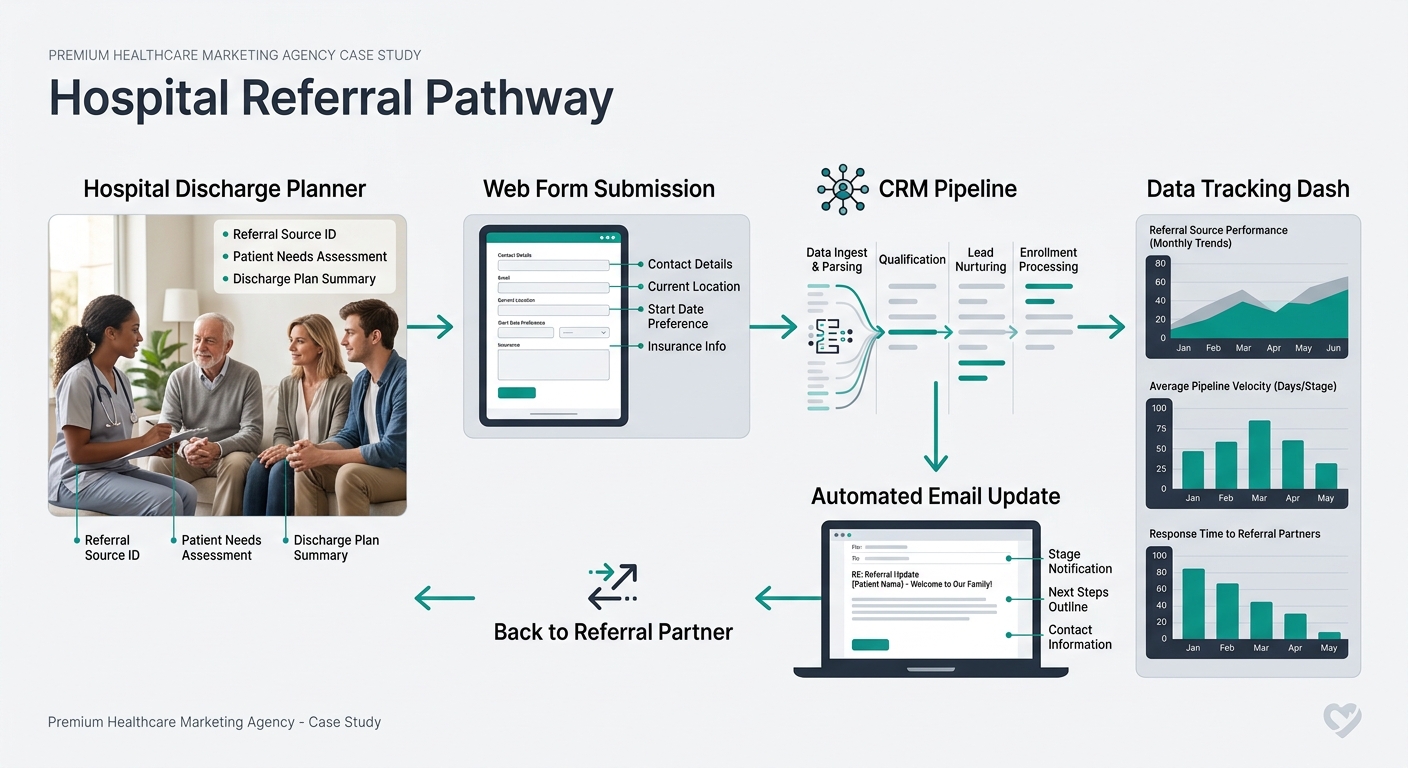
This model lets discharge planners submit referrals via email link or a simple web form without creating an account. The referral lands in your CRM pipeline automatically. When your team updates the deal stage, the partner gets an email notification. No portal login required. No phone call needed.
And the data backs up why this matters for growing your network. As Linear Health’s analysis of referral management software puts it, “the platform that eliminates coordinator hours and improves referral completion rates is better than the platform with the longest feature list.” That’s the hybrid advantage in one sentence: fewer coordinator hours, higher completion rates, and partners who actually engage because the friction is low.
The hybrid approach also solves a problem we’ve written about in our guide to building a referral source territory map: tracking which geographic clusters and facility types produce the highest-converting referrals. When referral data flows into your CRM automatically, you can segment by hospital system, physician group, or ZIP code without manual data entry.
Warning: A hybrid setup requires someone on your team to own the integration. If the CRM-to-referral-tool connection breaks and nobody notices for two weeks, you’ll lose referral data and damage partner trust. Assign a specific team member to monitor the data sync weekly.
The downside is complexity during setup. You’re configuring two systems and the bridge between them. If your agency doesn’t have someone comfortable with CRM workflows and basic integrations, expect 20-40 hours of initial setup plus ongoing maintenance. That’s still less than the 40-80 hours a full portal deployment requires, but it’s real work.
For agencies working to strengthen relationships with rehab facilities alongside hospitals, the hybrid model adapts well. The same referral workflow applies whether the source is a hospital social worker or a rehabilitation center marketing contact. One system handles both partner types without forcing either into a workflow designed for the other.
How To Choose Between These Three
The honest answer depends on three variables: your current referral volume, your team’s technical comfort, and how your referral partners prefer to communicate.
Pick the dedicated portal if you process 50+ referrals per month, have a full-time referral coordinator, and your top referral sources have asked for a way to track their placements. You need the volume to justify the cost and the staff to drive adoption. Without both, the portal becomes expensive shelf-ware.
Stick with a standard CRM if you’re under 30 active referral sources and your team already lives in HubSpot or Salesforce daily. The referral tracking won’t be fancy, but it’ll be consistent. Pair it with a structured outreach cadence so partners hear from you regularly even without self-service visibility. If your agency is still building its trust signals and credentials with referral sources, spending on a portal before you’ve earned partner loyalty is premature.
Go hybrid if you’re in the 30-100 referral source range and growing. This is where most mid-size home care agencies land, and the data supports the approach. You get partner-facing visibility without demanding portal adoption, CRM-native data without custom field headaches, and automated tracking that scales as you add referral sources.
Whichever direction you go, the deciding factor isn’t the software itself. It’s whether your referral partners will actually use what you build. A system that captures 90% of referrals through a low-friction workflow will always outperform a feature-rich platform that captures 40% because partners can’t be bothered to log in. Start from your partners’ daily reality and work backward to the technology. If you want help connecting the right referral infrastructure to a broader marketing strategy, get in touch with Care Marketing for a consultation tailored to your agency’s referral goals.